Yet another 4D Maze game
This is a four-dimensional maze game you can play in your web browser.
It is a fork of 4dmaze by Andreas Fackler. The game, the artwork and the levels are his; the original is still playable at afck.github.io/4dmaze. This fork adds two navigation aids and trims the display down to one mode - see what this fork changes. It is released under the same MIT licence as the original.
Understand it
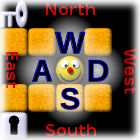
In a two-dimensional tile-based game, you have four directions to go: north, west, south and east. We use the W, A, S and D keys for these.
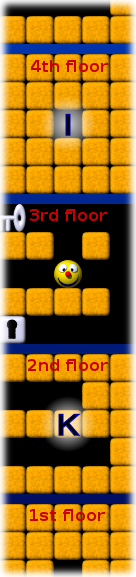
If the game has a third dimension, e. g. because it takes place in a building with several floors where every tile has staircases up and down, we would display each floor as its own grid, and stack the grids on top of each other. We use the I and K keys to go up and down.
In this mode of display, the vertical screen dimension now corresponds to two game dimensions: north/south and up/down. If you go north, you go up on the screen by the height of one tile, and if you go up to the next floor, you go up on the screen by the height of one floor grid. We display north as "minor up", so to speak, and up as "major up".
This game has four dimensions, so we need to display two additional directions in which you can move, let's call them ana and kata . Just as above you there's a parallel floor, with one particular tile right above your head and accessible via a staircase, there is a complete three-dimensional parallel building ana of this one, with one tile right next to you in the ana direction, accessible via some magic portal. And just like there is a floor below you, there is a parallel building kata of you.
To display the fourth dimension, we use the same trick that allowed us to show both north/south and up/down as the vertical screen dimension: We put the ana parallel building on the left and the kata one on the right, so that the horizontal screen dimension now corresponds both to east/west and to ana/kata. "Minor left" is west, and "major left" is ana. You can move ana with J and kata with L.
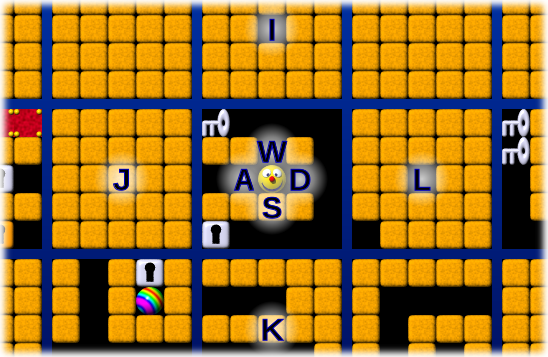
There's no gravity in this maze, so you don't need staircases. In fact, we treat all four dimensions completely equally: Going up isn't more difficult than going west. And since ana is just another direction, we don't need a magic portal to go there - after all, you also don't need a magic portal to go north! The tile you are standing on simply has eight directly adjacent tiles (not diagonally!) and you can move in any of the eight directions unless an obstacle is blocking your path.
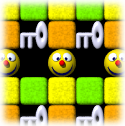
That's almost all you need to know about the geometry of the maze: The game is tile-based, takes place in a four-dimensional hyper-rectangularly shaped grid and allows you to move in eight directions between adjacent tiles. But one more thing: The maze wraps around! That is, if you leave it on one side, you enter it from the other side, just like in Pac-Man. You won't notice when you wrap around that way, though, as you are always displayed in the middle of the screen and the maze scrolls around you. If the maze is only three tiles wide in the north/south direction, you might see the same key twice: one tile to the north of yourself, and two tiles south of yourself. And if it is only two tiles wide in the east/west direction, you will see the square you are standing on, right beyond the one next to you!
Play it
Select a level - the provided ones are roughly in order of difficulty.
You see the hypercube of 5 * 5 * 5 * 5 tiles around your position: in each of the eight directions, you can see two tiles ahead. The [+] and [-] links beside the board change that by one tile at a time, from one tile ahead up to four. You can move around using these keys:
| W | move minor-up |
| A | move minor-left |
| S | move minor-down |
| D | move minor-right |
| I, or up arrow | move major-up |
| J, or left arrow | move major-left |
| K, or down arrow | move major-down |
| L, or right arrow | move major-right |
| + and - | zoom in and out, one tile at a time |
| T | toggle automatic dead end detection |
| H | show which key leads where |
| space | shuffle dimensions (i. e. rotate randomly for added confusion) |
| Ctrl+Z | undo the last move |
Your goal is to reach the goal: . On your way, you will find a few special items:
- A silver key allows you to remove one silver lock .
- A golden key allows you to remove one golden lock .
- There are boulders that can be pushed around,
- and boulder-shaped holes that can only be removed by pushing a boulder into them.
- Switches toggle whether the red or the green tiles can be passed.
What this fork changes
The hard part of a four-dimensional maze is not the maze. It is keeping track of where a major move will drop you, and remembering which of the corridors you have already walked down led nowhere. Both additions below are about that, and nothing about the maze rules themselves has changed.
Five tiles are always highlighted
The gold outline in the very middle is the tile you are standing on. The four cyan outlines are the centres of the grids immediately above, below, left and right of yours - exactly the tiles a major move takes you to. Those four are the hardest thing in the game to pick out by eye, so they are marked.
Dead ends are detected and fogged over
The ☁ button in the middle of the direction pad turns automatic dead end detection on and off; it starts on, and T toggles it too. While it is on, any tile you have stood on that turns out to be a dead end is covered in fog. As you back out of a blind corridor the fog follows you out, tile by tile, because each tile you leave behind now has only one way on.
- White fog: the walls themselves seal the tile off, so the mark is permanent.
- Red fog: the tile is a dead end only because red is blocking right now. Flip a switch and it lifts.
- Green fog: the same, while green is the blocking colour.
Fog is only ever drawn on tiles you have already visited, so it cannot give away a corridor you have not explored. It is recomputed from the live maze after every move, so pushing a boulder, opening a lock or flipping a switch immediately clears any fog that is no longer true.
A simpler display
The original offered four projections - flat plus three curved ones - and a continuous zoom. This fork keeps the flat projection only, and the zoom now steps in whole tiles: each press of [+] or [-] shows one tile more or less in every direction. The in-browser level editor and its construction mode have been removed.
Credits and licence
Original game, artwork and levels: Andreas Fackler, at github.com/afck/4dmaze, playable at afck.github.io/4dmaze. Copyright (c) 2015 Andreas Fackler, MIT licence. The explanation under "Understand it" above is his, kept as he wrote it.
This fork inherits that same MIT licence.